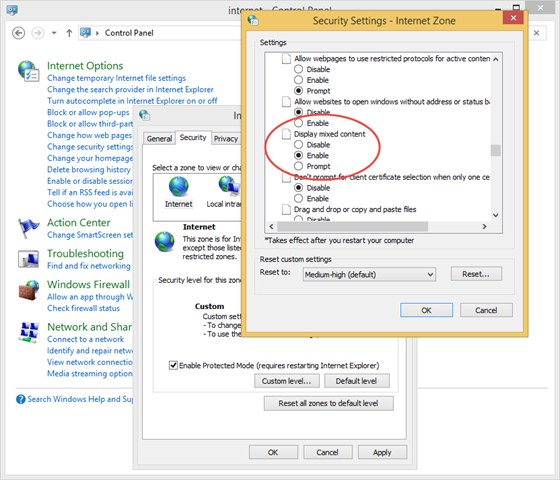
Today I updated my FireFox browser and Joomla 1.5x administrator panel stopped working in it. Looks like Joomla 1.5x administrator panel contains some staff that prevents it from working in all modern browsers except Internet Explorer, or at least Internet Explorer is the only browser that displays message “Only secure content is displayed.” and button “Show All Content” enabling some insecure mode. To eliminate the need of pressing this button each time I open new page in administrator panel I went to “Internet Options->Security Tab->Miscellaneous->Display mixed content” and chose “Enable”:
Category Archives: Operating Systems
How to find files by permission on Ubuntu
Today I accidentally changed permissions of all the files in some folder /usr/lib/git-core with the following command:
chmod o-rx *
At first I thought that I have broken my system, but in few minutes I remembered that I have the same distribution on some other machine, I listed the same folder on this machine and used the following commands to restore original permissions:
chmod o+rx *
find -maxdepth 1 -type f -perm 645 -exec chmod o-x {} \;
645 means the files that initially were -rw-r–r— and became -rw-r–r-x. This two commands saved me a lot of time. After that I even count the number of files with all permission combinations:
find -maxdepth 1 -type f -perm 644 | wc -l find -maxdepth 1 -type f -perm 755 | wc -l find -maxdepth 1 -type f -perm -o=x | wc -l
Installing Git on Ubuntu 12.04 and enabling HTTP access with Nginx
Git is a good alternative for developers who need a version control supported on both Windows and Linux platforms. Below I provided basic steps for installing Git on Ubuntu 12.04 and enabling HTTP access to the repositories with Nginx web server.
Installing required packages
First, we need to install Nginx and Git packages:
apt-get install nginx git
by default Nginx processes will run as www-data, (check “user” keyword in /etc/nginx/nginx.conf configuration file). Git installation has not created any user yet.
Installing Jabber Messaging Service on Ubuntu 12.04
Ejabberd (Jabber daemon written in Erlang programming language) can be easily installed on Ubuntu 12.04 Server (Precise Pangolin) with the following command:
apt-get install ejabberd
The only steps needed to make Ejabberd work after the installation are to specify admin user and hostname in /etc/ejabberd/ejabberd.cfg file:
%%%%%%%%%%%%%%%%%%%%%%%%%%%%%%%%%%%%%%%%%%%%%%%%%%%%%%%%%%%%%%%%%%%%%%%%%%%%%%%
%% Options which are set by Debconf and managed by ucf
%% Admin user
{acl, admin, {user, "admin", "developernote.com"}}.
%% Hostname
{hosts, ["developernote.com"]}.
%%%%%%%%%%%%%%%%%%%%%%%%%%%%%%%%%%%%%%%%%%%%%%%%%%%%%%%%%%%%%%%%%%%%%%%%%%%%%%%
Nginx 502 Bad Gateway error after updating Ubuntu 12.04
Today I updated my Ubuntu Server to 12.04.5 LTS (release 12.04, codename: precise), and got “502 Bad Gateway” on all my websites.
I checked Nginx log files and found that Nginx cannot open the socket created by PHP-FPM:
2014/09/11 19:01:03 [crit] 2741#0: *107 connect() to unix:/var/run/www-devnote.sock failed (13: Permission denied) while connecting to upstream, client: XXX.XX.X.XX, server: ~^(www\.)?(?<domain>.+)$, request: “GET /2014/04/using-a-wpf-control-in-a-mfc-application/ HTTP/1.1”, upstream: “fastcgi://unix:/var/run/www-devnote.sock:”, host: “developernote.com”
How to encrypt MySQL database in Ubuntu 12.04 LTS
Probably, the easiest way to encrypt MySQL database in Ubuntu is by using ecryptfs-utils. Install ecryptfs-utils:
apt-get install ecryptfs-utils
Mount /usr/local/encrypted directory and create mdf directory for MySQL data files (you will be prompted for passphrase and other options):
mkdir /usr/local/encrypted mount -t ecryptfs /usr/local/encrypted /usr/local/encrypted cd /usr/local/encrypted mkdir mdf chug.sh mysql mdf chmod og-rwx mdf
Ubuntu VPS Performance Monitoring
I run several PHP websites in Jooma and WordPress on Ubuntu VPS using Nginx as the web server with PHP-FPM for processing PHP. In most cases all the sites work fast enough, but sometimes (probably once a couple days) I got a message from Yandex (Russian search engine like Google) telling that one of my websites did not respond within 5 seconds. I set up Nginx slowlog and detected that sometimes HTTP requests are processed for more than 5 seconds:
Monitoring CPU Steal Time with command line in Ubuntu
Bash command that writes CPU Steal Time along with other CPU usage statistics from top command header once in a second to MySQL database:
top -b -d 1 | ts ‘%Y-%m-%d %H:%M:%S’ | sed -rn “s/(.{19} )Cpu\(s\):\s+([0-9]+\.[0-9]+)%us,\s+([0-9]+\.[0-9]+)%sy,\s+([0-9]+\.[0-9]+)%ni,\s+([0-9]+\.[0-9]+)%id,\s+([0-9]+\.[0-9]+)%wa,\s+([0-9]+\.[0-9]+)%hi,\s+([0-9]+\.[0-9]+)%si,\s+([0-9]+\.[0-9]+)%st(.*)/INSERT INTO m_perf_stat (CDate, cpu_us, cpu_sy, cpu_ni, cpu_id, cpu_wa, cpu_hi, cpu_si, cpu_st) VALUES (‘\1′, \2, \3, \4, \5, \6, \7, \8, \9);/p” | mysql -u <username> -p<password> <database>
that’s the longest bash command I ever written in my life ![]()
Configuring Firewall to enable FTP, SSH and HTTP on Ubuntu
Check your currently implemented firewall rules with the following command:
iptables -L
Examine the output. On a clean Ubuntu installation you will see an empty ruleset:
Chain INPUT (policy ACCEPT) target prot opt source destination Chain FORWARD (policy ACCEPT) target prot opt source destination Chain OUTPUT (policy ACCEPT) target prot opt source destination
How to encrypt swap on Ubuntu 12.04
Without going into particulars, it suffices to say that Ubuntu 12.04 has the following script that sets up encrypted swap:
ecryptfs-setup-swap