Author Archives: dmitriano

Installing Ubuntu 26.10 on WSL 2 from PowerShell

Ubuntu 26.10 can be installed from PowerShell as a separate WSL 2 distribution using the official .wsl image. This example is for an x64 Windows machine with WSL 2 already working.

When I checked the available distributions, Ubuntu 26.10 was missing from wsl --list --online. The official Ubuntu release directory provides an AMD64 WSL image that can be installed directly.

(more…)

Installing GCC 16.2 on Ubuntu 26.10 and 24.04

GCC 16.2 can be installed directly from the Ubuntu 26.10 repositories. On Ubuntu 24.04, the exact release can instead be built from source alongside the existing GCC 13 installation. This guide puts the package-based installation first, followed by the source build, then shows how to switch GCC and G++ together with update-alternatives for existing CMake projects.

Choose the installation section for your Ubuntu release. Ubuntu 26.04 LTS and Ubuntu 26.10 have different GCC packages: the catalog checked for 26.04 lists a development snapshot, while 26.10 provides GCC 16.2. These are installation instructions; the source-build starting machine has Ubuntu 24.04 on x86-64 and GCC 13.3.0.

(more…)

Cloning a Git Repository over SSH Without a Password on Ubuntu

When I tried to clone a Git repository from my Ubuntu laptop over SSH, the server asked for the git user’s password. I already had an Ed25519 public key on the laptop. Here is how to authorize that key on the server so Git can use it instead of asking for the remote account password.

git clone git@git.developernote.com:~/repositories/tradeclient.git
Cloning into 'tradeclient'...
git@git.developernote.com's password:
(more…)

Using the Oyster CLI Wallet: Installing Pearl, Sending PRL, and Understanding Change

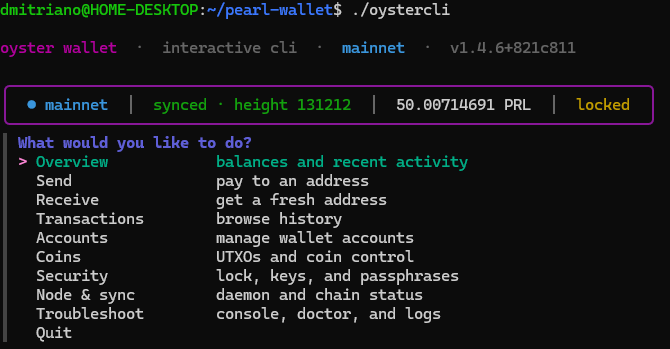
I used the Oyster command-line wallet to send 32.8 PRL to my SafeTrade deposit address. The transaction had two outputs, and the block explorer showed a smaller balance than my wallet. Here is how I installed and ran the wallet, and why those two balances differed.

(more…)

Running Codex Tasks from the CLI: Authentication and MCP Setup

I wanted to run the same work as a Codex scheduled task from the command line, sign in with my ChatGPT account, and connect an MCP server. These are separate steps: Scheduled manages the recurring task, codex exec runs a prompt, and codex mcp configures the tools available to the CLI. The examples below use Windows PowerShell.

Can the CLI launch an existing Scheduled task?

As of October 17, 2026, the documented CLI does not provide the Scheduled management interface or a command to run an existing scheduled task by name or ID. Use the desktop app or ChatGPT web to manage Scheduled tasks. The CLI can run the same instructions independently, but this does not trigger the saved Scheduled task. See the official Scheduled tasks documentation.

Save the full task instructions in task.txt, then pass that file to Codex:

Get-Content -Raw -Encoding UTF8 .\task.txt | codex exec -
(more…)

Changing a Domain Password When Paste Fails in PowerShell

While changing a domain administrator’s password in Windows PowerShell on a domain controller, I ran into a paste problem with Read-Host -AsSecureString. Typing a password manually worked, but pasting into the hidden prompt left the variable empty. Reading the clipboard with Get-Clipboard and converting its contents to a SecureString worked in the same session.

This is the procedure I used. It changes the password of the currently signed-in domain account and requires its existing password.

(more…)

An example when we really need std::shared_ptr in C++

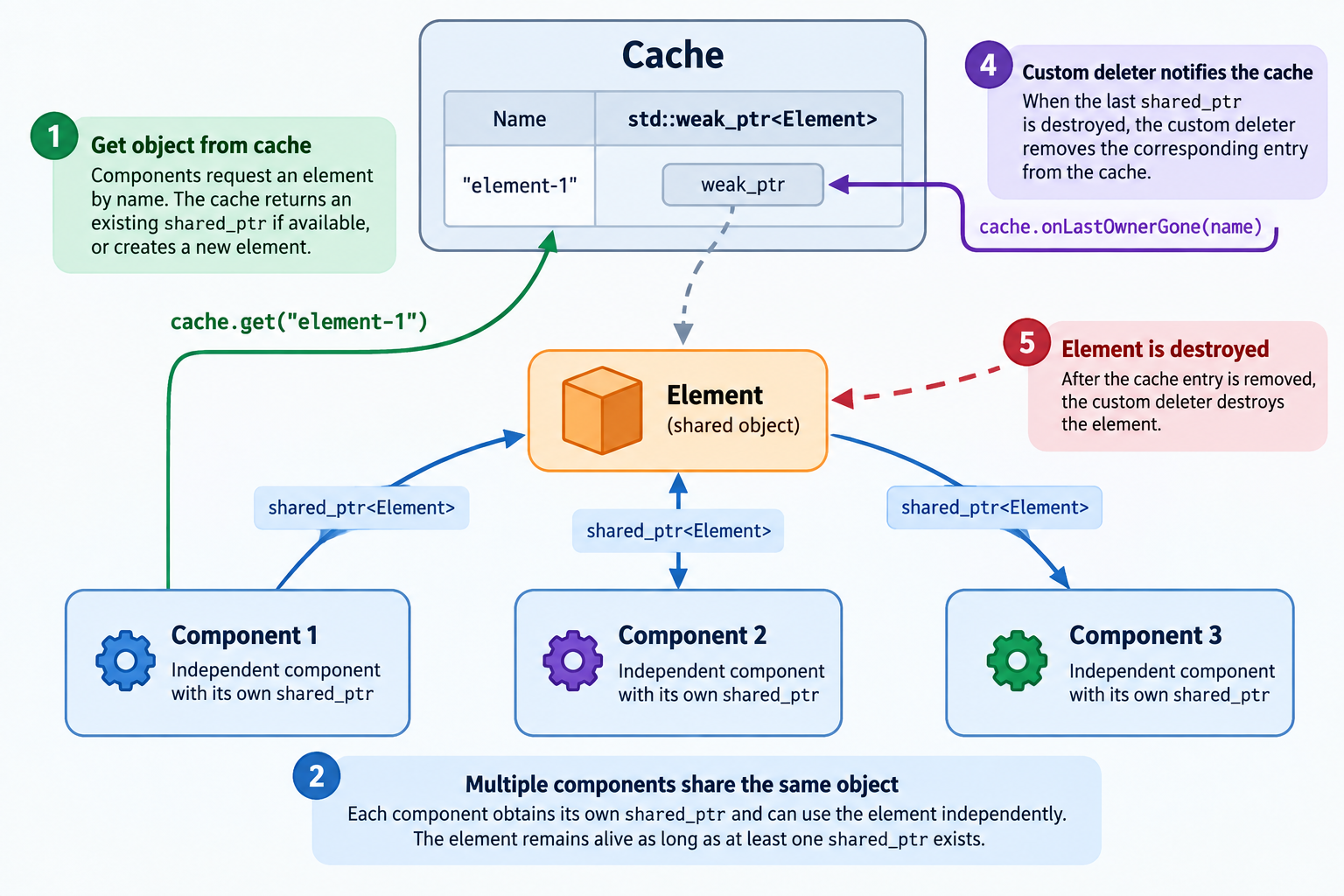
A practical example of using std::shared_ptr, std::weak_ptr, and a custom deleter to implement a thread-safe object cache. Multiple independent components can share the same object by retrieving it by name. When the last owner releases its shared_ptr, the custom deleter automatically removes the corresponding entry from the cache and destroys the object.

This example demonstrates how shared ownership simplifies object lifetime management without requiring centralized tracking of individual users.

(more…)

An example of how GCC 13 optimizes std::memcpy

C++ code below demonstrates how GCC 13 optimizes std::memcpy and a temporary std::array:

#include <array>
#include <cstddef>
#include <cstdint>
#include <cstring>
#include <iomanip>
#include <iostream>
#include <new>
#include <type_traits>

template <class T>
T* startLifetimeAs(void* const buffer)
{
    std::array<std::byte, sizeof(T)> representation;

    // Preserve the bytes before placement new ends the previous lifetime.
    std::memcpy(representation.data(), buffer, representation.size());

    // Start the lifetime of T in the original storage.
    T* const result = ::new (buffer) T;

    // Initialize the object representation of the newly created T.
    std::memcpy(result, representation.data(), representation.size());

    return result;
}
(more…)

How Placement New Ends an Object’s Lifetime

Below I provided an example demonstrating how placement new creates multiple objects within the same byte storage. Non-overlapping objects can coexist, while constructing an overlapping object ends the lifetime of the previously existing object. Accessing an object after its lifetime has ended causes undefined behavior.

#include <cstddef>
#include <cstdint>
#include <iostream>
#include <new>

struct Packet final
{
    std::uint64_t Data[4];
};

struct A final
{
    std::uint32_t First;
    std::uint32_t Second;
};

struct B final
{
    std::uint32_t First;
    std::uint32_t Second;
};

struct C final
{
    std::uint32_t Value;
};
(more…)

Examples of Undefined Behavior Related to Type Accessibility in C++

From C++ standard:

Attempting to read or modify the stored value through any other type results in undefined behavior.

Any other type means type accessablity:

The first basic example illustrating this principle:

#include <cstdint>

std::uint32_t toInt(float value)
{
    auto* p = reinterpret_cast<std::uint32_t*>(&value); // The cast itself is permitted.
    return *p; // Undefined behavior: accesses a float object through a std::uint32_t glvalue.
}
(more…)