I used the Oyster command-line wallet to send 32.8 PRL to my SafeTrade deposit address. The transaction had two outputs, and the block explorer showed a smaller balance than my wallet. Here is how I installed and ran the wallet, and why those two balances differed.
Installing the Pearl tools
The install.sh script downloads Pearl release binaries from GitHub, verifies the archive against the release’s SHA-256 checksums, and installs pearld, prlctl, and oyster. It also installs oystercli when the selected release includes it. The script supports Linux and macOS on amd64 and arm64.
View the installation script on GitHub or download install.sh. These links follow the master branch, so the script may change over time.
To install the binaries in a working directory:
mkdir -p ~/pearl-wallet
cd ~/pearl-wallet
curl -fL https://raw.githubusercontent.com/pearl-research-labs/pearl/master/install.sh -o install.sh
less install.sh
sh install.sh --bin-dir "$PWD"
Without --bin-dir, the script uses $XDG_BIN_HOME if set, or ~/.local/bin otherwise. It selects the latest stable release by default; --version selects a specific release tag.
On Linux, the configuration files are ~/.pearld/pearld.conf, ~/.oyster/oyster.conf, and ~/.prlctl/prlctl.conf. The script generates RPC credentials when needed and preserves existing configurations that already contain credentials. The generated RPC listeners are bound to localhost, with TLS enabled by default.
Starting the wallet and its interactive interface
For a new wallet, run the creation command first and follow its prompts. Keep the wallet recovery information somewhere secure:
./oyster --create
For an existing wallet, skip creation. Start the wallet service:
cd ~/pearl-wallet
./oyster
Leave it running and open another terminal:
cd ~/pearl-wallet
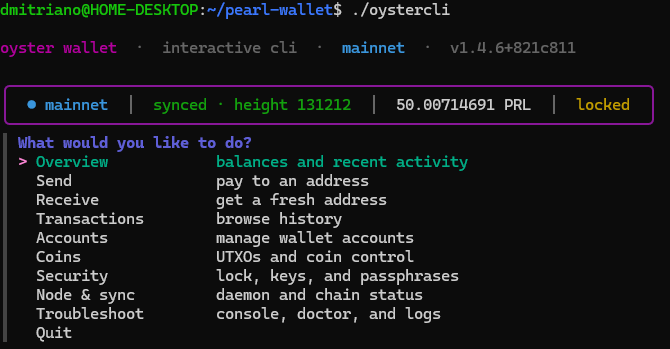
./oystercli
The installer configures Oyster to synchronize using SPV by default, so a local pearld full node is not required for this setup. In my session, the wallet reported version 1.4.6+821c811.
The interactive menu includes Overview, Send, Receive, Transactions, Accounts, Coins, Security, and Node & sync. Wait for synchronization before checking balances or sending funds.
Sending PRL to SafeTrade
I selected Send, entered my SafeTrade PRL deposit address, and specified 32.8 PRL. Before confirming, check the address and network against the exchange’s deposit page. The wallet requested an unlock, then broadcast the transaction.
My transaction ID was:
7f2053bd7aab3a3a2d436c94c6c489dcd0387234f6be33ab39aab57a9d85e149
Why one payment produced two outputs
The transaction spent previously received outputs totaling 33.6731776 PRL. It split that amount as follows:
| Destination | Amount (PRL) |
|---|---|
| SafeTrade deposit address | 32.80000000 |
| Wallet change address | 0.87315873 |
| Network fee | 0.00001887 |
The fee is the difference between the input and output totals; it is not a third output. The second output returns change to another address controlled by the wallet. I did not enter that address manually.
This is how a UTXO transaction works: selected outputs are spent in full, and the amount left after the payment and fee is returned as change. Two outputs do not mean that I made two separate payments.
Why the explorer showed 49.13 PRL while the wallet showed 50.00 PRL
Before sending, my balance was 82.80716578 PRL. After paying the exchange and the fee, the wallet balance was:
82.80716578 - 32.80000000 - 0.00001887 = 50.00714691 PRL
However, the explorer page I had opened displayed the balance of my original address, not the entire wallet:
| Location | Balance (PRL) |
|---|---|
| Original address | 49.13398818 |
| Change address | 0.87315873 |
| Total in the wallet | 50.00714691 |
The difference was exactly the change amount. Even after confirmation, the original address page continued to show 49.13398818 PRL, because the change was at another address.
Immediately after broadcasting, the CLI header also showed 49.13398818 PRL. After confirmation and refresh, Overview and the header both showed 50.00714691 PRL. The screenshots establish that sequence, though they do not establish the precise internal reason for the temporary header value.
There was no need to send the change back to the original address: both addresses were already part of the same wallet. A wallet balance can include funds held at multiple addresses.