I realized that my LDAPS certificate is not trusted with the following command in PowerShell:
certutil -verify ldap.crt
I realized that my LDAPS certificate is not trusted with the following command in PowerShell:
certutil -verify ldap.crt
I configured Kerberos on Ubuntu 24.04 WSL and was able to run the following command:
export KRB5_TRACE=/dev/stderr
ldapsearch -H ldap://myserver.my.local -Y GSSAPI
that produced the following output:
(more…)C# code:
public void bindWithMs(string ldapServer, int ldapPort, string ldapUser, string ldapPassword)
{
    var ldap = new System.DirectoryServices.Protocols.LdapDirectoryIdentifier(ldapServer, ldapPort);

    using (var connection = new System.DirectoryServices.Protocols.LdapConnection(ldap))
    {
        connection.AuthType = System.DirectoryServices.Protocols.AuthType.Negotiate;
        connection.Timeout = TimeSpan.FromSeconds(120);

        connection.SessionOptions.ProtocolVersion = 3;
        connection.SessionOptions.Signing = true;
        connection.SessionOptions.Sealing = true;

        connection.Credential = new System.Net.NetworkCredential(ldapUser, ldapPassword);
        connection.Bind();
    }
}
sudo apt  install tcpdump
sudo tcpdump -i any -w ldaps.pcap 'tcp port 636' &
export SSLKEYLOGFILE=/home/dmitriano/dev/work/sslkeys.log
ldapsearch -H ldaps://$localhost:636 -x -D $ad_user -w $ad_password -b "DC=my,DC=local"
ll
-rw-r--r-- 1 tcpdump   tcpdump   246320 Oct 14 13:50 ldaps.pcap
-rw-r--r-- 1 dmitriano dmitriano    176 Oct 14 13:47 sslkeys.log
I set Verbose level:
(Get-ItemProperty "HKLM:\SYSTEM\CurrentControlSet\Services\NTDS\Diagnostics")."16 LDAP Interface Events"
0
Set-ItemProperty -Path "HKLM:\SYSTEM\CurrentControlSet\Services\NTDS\Diagnostics" -Name "16 LDAP Interface Events" -Value 5
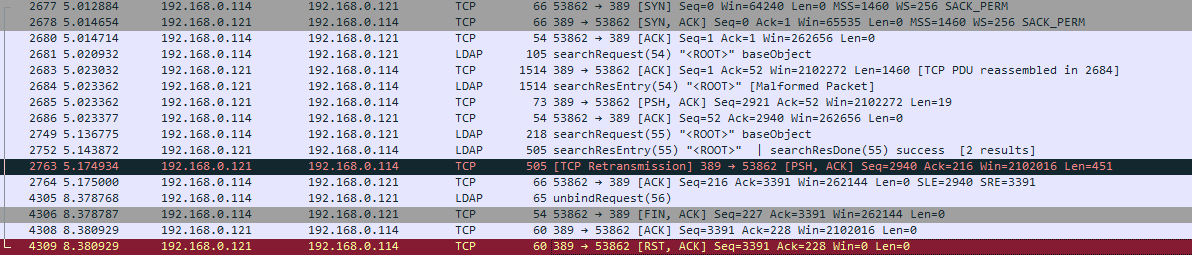
LDAP Connect/disconnect from Client 192.168.0.121 to Domain Controller 192.168.0.121, WireShark on DC:
Download and install latest Go:
wget https://go.dev/dl/go1.25.1.linux-amd64.tar.gz
tar xf ../distrib/go1.25.1.linux-amd64.tar.gz
realpath go
export GOROOT=/home/dmitriano/dev/tools/go
export GOPATH=$HOME/go
export PATH=$GOPATH/bin:$GOROOT/bin:$PATH
Install the package:
go install github.com/hamano/lb@latest
Extract the archive:
tar xf /mnt/c/Users/dmitriano/Downloads/apache-jmeter-5.6.3.tgz
Install Java runtime:
sudo apt install default-jre
java --version
openjdk 21.0.8 2025-07-15
OpenJDK Runtime Environment (build 21.0.8+9-Ubuntu-0ubuntu124.04.1)
OpenJDK 64-Bit Server VM (build 21.0.8+9-Ubuntu-0ubuntu124.04.1, mixed mode, sharing)
LDAP SASL, or Simple Authentication and Security Layer for LDAP, is a framework providing a unified way to authenticate clients to LDAP servers using various security mechanisms, such as Kerberos, GSSAPI, or PLAIN.
GSSAPI, or the Generic Security Services API, is a standardized framework that provides a way for applications to access security services, like authentication, in a mechanism-independent manner.