VS2015 has an exciting ability to debug a C++ application on Android Emulator, but in this article I will talk about no less exciting and more time expensive ability to debug a C++ application on a real Android device. The first thing we need to spend the time with is figuring out how to enable USB debugging mode on our Android device. On my ASUS Zenfone I need to go to Settings->About->Software Information and tap on Build Number 7 times, after that I have USB debugging check box in Settings->Developer Options that I should tap as well:
Category Archives: C++
Listening to a dependency property changes in Universal Windows App in C++
If you want to be notified when some dependency property of a control changes, for example, UIElement::Visibility, you can do the following trick. First declare you own dependency property of the same type in some class:
public ref class MyListener
{
public:
static property Windows::UI::Xaml::DependencyProperty ^ BoundVisibilityProperty
{
Windows::UI::Xaml::DependencyProperty ^ get() { return boundVisibilityProperty; }
}
property Windows::UI::Xaml::Visibility BoundVisibility
{
Windows::UI::Xaml::Visibility get() { return safe_cast<Windows::UI::Xaml::Visibility>(GetValue(boundVisibilityProperty)); }
void set(Windows::UI::Xaml::Visibility value) { SetValue(boundVisibilityProperty, value); }
}
static Windows::UI::Xaml::DependencyProperty ^ boundVisibilityProperty;
static void OnBoundVisibilityChanged(DependencyObject^ d, Windows::UI::Xaml::DependencyPropertyChangedEventArgs^ e);
};
Initialization of UWP C++ XAML application
UWP C++ applications based on “DirectX 11 and XAML App” or “XAML App for OpenGL ES“ project templates have some partial App class defined in user code and in generated file App.g.h:
partial ref class App : public ::Windows::UI::Xaml::Application,
public ::Windows::UI::Xaml::Markup::IXamlMetadataProvider
{
public:
void InitializeComponent();
[Windows::Foundation::Metadata::DefaultOverload]
virtual ::Windows::UI::Xaml::Markup::IXamlType^ GetXamlType(::Windows::UI::Xaml::Interop::TypeName type);
virtual ::Windows::UI::Xaml::Markup::IXamlType^ GetXamlType(::Platform::String^ fullName);
virtual ::Platform::Array<::Windows::UI::Xaml::Markup::XmlnsDefinition>^ GetXmlnsDefinitions();
private:
::XamlTypeInfo::InfoProvider::XamlTypeInfoProvider^ _provider;
bool _contentLoaded;
};
the user code:
ref class App sealed
{
public:
App();
virtual void OnLaunched(Windows::ApplicationModel::Activation::LaunchActivatedEventArgs^ e) override;
...
};
Creating cross platform (Android, iOS, UWP) OpenGLES 2 applications with VS2015
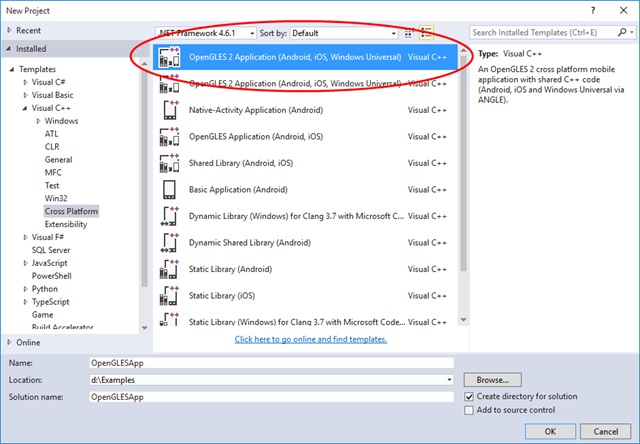
Cross platform (Android, iOS, UWP) OpenGLES 2 application can be easily created in VS2015 using “OpenGLES 2 Application (Android, iOS, Windows Universal)” project template:
Using Visual Leak Detector with MS Visual Studio 2013
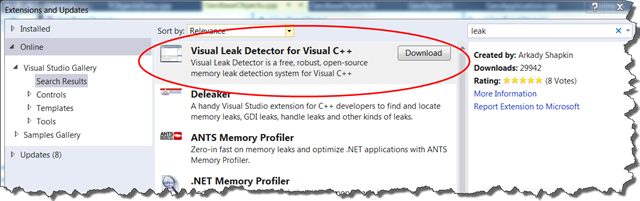
Go to Tools->Extensions and Updates, download and install Using Visual Leak Detector:
Create a header file, named, for example, CommonTools.h containing the following:
#pragma once #include "C:\Program Files (x86)\Visual Leak Detector\include\vld.h" #pragma comment(lib, "C:\\Program Files (x86)\\Visual Leak Detector\\lib\\Win32\\vld.lib")
Include CommonTools.h in at least one file in all the C++ projects in your solution. Build debug version of the program. Visual Leak Detector will write the information on memory leaks to Output window when the program exits.
How I fixed “error LNK2005: _DllMain@12 already defined in msvcrtd.lib”
Today I got “error LNK2005: _DllMain@12 already defined in msvcrtd.lib” while linking some C++ CLI project with MFC support in MS Visual Studio 2013. As described in A LNK2005 error occurs when the CRT library and MFC libraries are linked in the wrong order in Visual C++A LNK2005 error occurs when the CRT library and MFC libraries are linked in the wrong order in Visual C++ article, I added /verbose:lib linker option:
Using a WPF control in a MFC application
I’ve been working on some MFC application and to apply my WPF knowledge I added a WPF control written in C# to my MFC CView with the following code:
int CMyView::OnCreate(LPCREATESTRUCT lpCreateStruct)
{
if (CView::OnCreate(lpCreateStruct) == -1)
return -1;
try
{
gcroot<hwndsource ^> hwnd_source = gcnew HwndSource(0, WS_VISIBLE | WS_CHILD, 0, 0, 0, "HwndSource", IntPtr(m_hWnd));
MyWpfControl ^ control = gcnew MyWpfControl();
hwnd_source->RootVisual = control;
}
catch (Exception ^ ex)
{
String ^ msg = ex->Message;
}
return 0;
}
All that I needed to do is to follow the steps described in this post: How do I host WPF content in MFC Applications, fix VS2012 bug described here, and got rid of std::mutex and std::lock_guard replacing them with the following classes using typedefs:
How to compile BOOST with MS Visual Studio 2010-2017
Fortunately, to compile BOOST with MS VC 2010 we need Visual Studio Command Prompt and five commands:
Navigate to BOOST directory, for example:
F: cd F:\Projects\Lib\boost_1_53_0
Generalization of auto_ptr<T> for working with Win32 API
A long time ago, STL had auto_ptr<Type> class that automatically deleted a dynamically allocated C++ object when control leaves a block. Personally, I believe that auto_ptr<Type> was typically used in simple scenarios as a local variable or a class member but theoretically it is even possible to declare a vector of auto_ptr<Type> because auto_ptr<Type> stores an ownership indicator and its copy constructor transfers the ownership from the instance being copied, so vector::push_back(…) and vector::resize(…) functions works correctly.