I installed Ollama on Windows to run local language models on an RTX 5060 Ti 16 GB, measure GPU and RAM usage, and connect an existing Binance MCP server. Here are the actual commands, results, and problems from the experiment.
Install Ollama on Windows
Run the official installer from a regular PowerShell session (administrator rights were not required in this test). Check the installed version:
irm https://ollama.com/install.ps1 | iex
ollama --version
The installed version was 0.40.2. Start with IBM Granite 4.0 H Tiny:
ollama run granite4:tiny-h
The tag granite4:tiny returned a manifest-not-found error; granite4:tiny-h was the correct name. Once loaded, type your prompt after the >>> marker.
Check GPU and RAM usage
In another PowerShell window, inspect the active model and GPU:
ollama ps
nvidia-smi
Look at the PROCESSOR and CONTEXT columns. Granite reported 100% GPU and 4096 context tokens. GPU-Z may briefly display 0% GPU Load between inference bursts; this does not mean the model is running on CPU.
To inspect RAM used by Ollama and its separate inference process:
Get-Process | Where-Object { $_.ProcessName -match "ollama|llama" } |
  Select-Object ProcessName, Id,
    @{N="RAM_GB";E={[math]::Round($_.WorkingSet64/1GB,2)}},
    @{N="Private_GB";E={[math]::Round($_.PrivateMemorySize64/1GB,2)}}
In one measurement, the inference process had approximately 0.78 GB of working-set RAM and 5.27 GB of private committed memory. This is a single observation, not a performance benchmark. It compared favorably with our earlier LM Studio tests, which sometimes consumed almost all 32 GB of system RAM.
Download, list, and unload models
ollama pull gpt-oss:20b
ollama pull ministral-3:14b
ollama list
ollama ps
ollama stop granite4:tiny-h
ollama stop gpt-oss:20b
ollama list shows downloaded models; ollama ps shows loaded ones. ollama stop unloads a model from memory without deleting it from disk.
GPT-OSS 20B ran at 100% GPU placement on the RTX 5060 Ti 16 GB with around 12–13 GB GPU memory in use. Ministral 3 14B required roughly 9.1 GB for its downloaded weights.
Increase context to 8192 tokens
Instead of modifying the original model, create a second configuration. PowerShell here-strings let us write the Modelfile:
@'
FROM gpt-oss:20b
PARAMETER num_ctx 8192
'@ | Set-Content -Encoding ascii Modelfile
ollama create gpt-oss-8k -f Modelfile

@'
FROM ministral-3:14b
PARAMETER num_ctx 8192
'@ | Set-Content -Encoding ascii Modelfile
ollama create ministral-8k -f Modelfile
Start a model and verify the loaded context:
ollama run gpt-oss-8k
ollama ps
The GPT-OSS variant reported CONTEXT 8192 and 100% GPU. A larger context consumes additional memory, so always verify placement with ollama ps.
Connect Ollama to a Binance MCP server
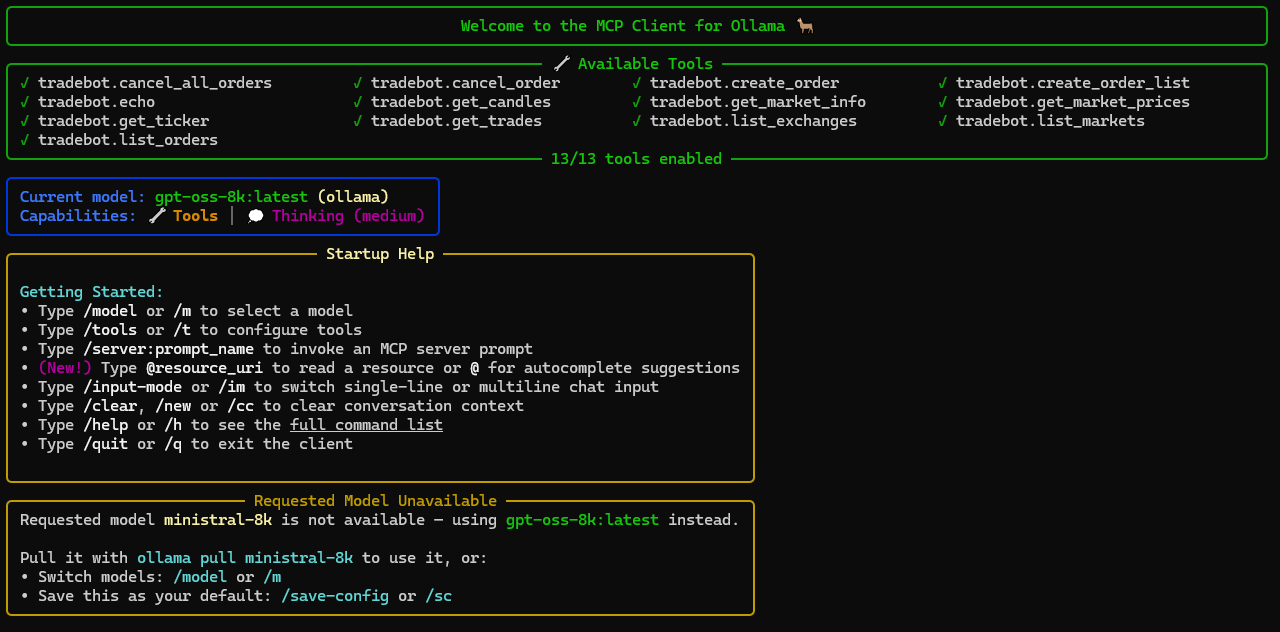
Ollama serves the model; the separate ollmcp client supplies MCP tools. We connected an existing Streamable HTTP MCP server named tradebot:
python -m pip install --upgrade ollmcp
ollmcp --help
ollmcp mcp add --transport http --scope user tradebot http://192.168.0.145:52034/mcp
ollmcp mcp list
ollmcp --model gpt-oss-8k
The address is an example from a private LAN; replace it with your own server URL. The client discovered 13 tools, including market-data functions such as get_ticker and get_candles. Useful interactive commands:
/tools
/context-info
/show-metrics
/thinking-mode
/reasoning-effort
/loop-limit
/clear
/quit
Safety note: The server also exposes order placement and cancellation tools. Disable write/trading tools when doing read-only research, particularly before turning off tool confirmations.
Results and limitations
Granite 4.0 H Tiny: loaded fully on the GPU and used little RAM, but once sent an invalid symbols argument to get_ticker and then fabricated a result after receiving an error.
GPT-OSS 20B: successfully called the Binance MCP server and obtained a ticker. However, longer market scans sometimes ended with No Response from Model, and some date conversions were wrong.
Ministral 3 14B: also called MCP tools, but produced invalid duration parameters and mixed up historical ranges. Increasing the context did not eliminate these mistakes.
Conclusion: Ollama successfully placed these models on the GPU with much better RAM behavior in our tests. For trading analysis, calculations, timestamp validation, and scans of many markets should be handled by deterministic code in the MCP server; the LLM can interpret and explain verified results.
References: Ollama installation, Ollama model library, and ollmcp.