C# code:
public void bindWithMs(string ldapServer, int ldapPort, string ldapUser, string ldapPassword)
{
    var ldap = new System.DirectoryServices.Protocols.LdapDirectoryIdentifier(ldapServer, ldapPort);

    using (var connection = new System.DirectoryServices.Protocols.LdapConnection(ldap))
    {
        connection.AuthType = System.DirectoryServices.Protocols.AuthType.Negotiate;
        connection.Timeout = TimeSpan.FromSeconds(120);

        connection.SessionOptions.ProtocolVersion = 3;
        connection.SessionOptions.Signing = true;
        connection.SessionOptions.Sealing = true;

        connection.Credential = new System.Net.NetworkCredential(ldapUser, ldapPassword);
        connection.Bind();
    }
}
SASL bind requires the name to be in the form {user}@{domain}:
-c -l -s "192.168.0.123" -p "389" -u "Administrator@my.local" -w "1234@abc"
WireShark:
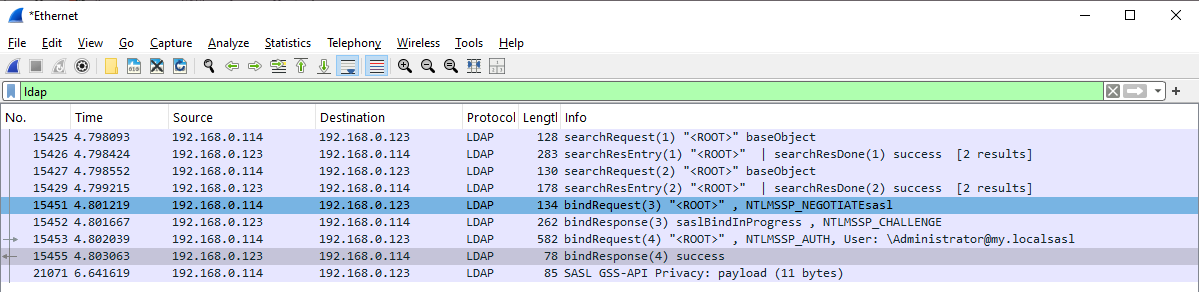
LDAP Request:
Lightweight Directory Access Protocol
    LDAPMessage bindRequest(3) "<ROOT>" sasl
        messageID: 3
        protocolOp: bindRequest (0)
            bindRequest
                version: 3
                name: <MISSING>
                authentication: sasl (3)
                    sasl
                        mechanism: GSS-SPNEGO
                        credentials: 4e544c4d5353500001000000b78208e2000000000000000000000000000000000a00614a0000000f
                        GSS-API Generic Security Service Application Program Interface
                            NTLM Secure Service Provider
                                NTLMSSP identifier: NTLMSSP
                                NTLM Message Type: NTLMSSP_NEGOTIATE (0x00000001)
                                Negotiate Flags: 0xe20882b7, Negotiate 56, Negotiate Key Exchange, Negotiate 128, Negotiate Version, Negotiate Extended Session Security, Negotiate Always Sign, Negotiate NTLM key, Negotiate Lan Manager Key, Negotiate Seal, Negotiate Sign
                                    1... .... .... .... .... .... .... .... = Negotiate 56: Set
                                    .1.. .... .... .... .... .... .... .... = Negotiate Key Exchange: Set
                                    ..1. .... .... .... .... .... .... .... = Negotiate 128: Set
                                    ...0 .... .... .... .... .... .... .... = Negotiate 0x10000000: Not set
                                    .... 0... .... .... .... .... .... .... = Negotiate 0x08000000: Not set
                                    .... .0.. .... .... .... .... .... .... = Negotiate 0x04000000: Not set
                                    .... ..1. .... .... .... .... .... .... = Negotiate Version: Set
                                    .... ...0 .... .... .... .... .... .... = Negotiate 0x01000000: Not set
                                    .... .... 0... .... .... .... .... .... = Negotiate Target Info: Not set
                                    .... .... .0.. .... .... .... .... .... = Request Non-NT Session Key: Not set
                                    .... .... ..0. .... .... .... .... .... = Negotiate 0x00200000: Not set
                                    .... .... ...0 .... .... .... .... .... = Negotiate Identify: Not set
                                    .... .... .... 1... .... .... .... .... = Negotiate Extended Session Security: Set
                                    .... .... .... .0.. .... .... .... .... = Negotiate 0x00040000: Not set
                                    .... .... .... ..0. .... .... .... .... = Target Type Server: Not set
                                    .... .... .... ...0 .... .... .... .... = Target Type Domain: Not set
                                    .... .... .... .... 1... .... .... .... = Negotiate Always Sign: Set
                                    .... .... .... .... .0.. .... .... .... = Negotiate 0x00004000: Not set
                                    .... .... .... .... ..0. .... .... .... = Negotiate OEM Workstation Supplied: Not set
                                    .... .... .... .... ...0 .... .... .... = Negotiate OEM Domain Supplied: Not set
                                    .... .... .... .... .... 0... .... .... = Negotiate Anonymous: Not set
                                    .... .... .... .... .... .0.. .... .... = Negotiate 0x00000400: Not set
                                    .... .... .... .... .... ..1. .... .... = Negotiate NTLM key: Set
                                    .... .... .... .... .... ...0 .... .... = Negotiate 0x00000100: Not set
                                    .... .... .... .... .... .... 1... .... = Negotiate Lan Manager Key: Set
                                    .... .... .... .... .... .... .0.. .... = Negotiate Datagram: Not set
                                    .... .... .... .... .... .... ..1. .... = Negotiate Seal: Set
                                    .... .... .... .... .... .... ...1 .... = Negotiate Sign: Set
                                    .... .... .... .... .... .... .... 0... = Request 0x00000008: Not set
                                    .... .... .... .... .... .... .... .1.. = Request Target: Set
                                    .... .... .... .... .... .... .... ..1. = Negotiate OEM: Set
                                    .... .... .... .... .... .... .... ...1 = Negotiate UNICODE: Set
                                Calling workstation domain: NULL
                                Calling workstation name: NULL
                                Version 10.0 (Build 19041); NTLM Current Revision 15
                                    Major Version: 10
                                    Minor Version: 0
                                    Build Number: 19041
                                    NTLM Current Revision: 15
        [Response In: 15452]
Response:
Lightweight Directory Access Protocol
    LDAPMessage bindResponse(4) success
        messageID: 4
        protocolOp: bindResponse (1)
            bindResponse
                resultCode: success (0)
                matchedDN: <MISSING>
                errorMessage: <MISSING>
                serverSaslCreds: <MISSING>
        [Response To: 15453]
        [Time: 1.024000 milliseconds]
I tried to switch signing off with the following C# code:
connection.SessionOptions.Signing = false;
but it still in on in WireShark:
Lightweight Directory Access Protocol
    LDAPMessage bindRequest(3) "<ROOT>" sasl
        messageID: 3
        protocolOp: bindRequest (0)
            bindRequest
                version: 3
                name: <MISSING>
                authentication: sasl (3)
                    sasl
                        mechanism: GSS-SPNEGO
                        credentials: 4e544c4d5353500001000000978208e2000000000000000000000000000000000a00614a0000000f
                        GSS-API Generic Security Service Application Program Interface
                            NTLM Secure Service Provider
                                NTLMSSP identifier: NTLMSSP
                                NTLM Message Type: NTLMSSP_NEGOTIATE (0x00000001)
                                Negotiate Flags: 0xe2088297, Negotiate 56, Negotiate Key Exchange, Negotiate 128, Negotiate Version, Negotiate Extended Session Security, Negotiate Always Sign, Negotiate NTLM key, Negotiate Lan Manager Key, Negotiate Sign, Request Target
                                    1... .... .... .... .... .... .... .... = Negotiate 56: Set
                                    .1.. .... .... .... .... .... .... .... = Negotiate Key Exchange: Set
                                    ..1. .... .... .... .... .... .... .... = Negotiate 128: Set
                                    ...0 .... .... .... .... .... .... .... = Negotiate 0x10000000: Not set
                                    .... 0... .... .... .... .... .... .... = Negotiate 0x08000000: Not set
                                    .... .0.. .... .... .... .... .... .... = Negotiate 0x04000000: Not set
                                    .... ..1. .... .... .... .... .... .... = Negotiate Version: Set
                                    .... ...0 .... .... .... .... .... .... = Negotiate 0x01000000: Not set
                                    .... .... 0... .... .... .... .... .... = Negotiate Target Info: Not set
                                    .... .... .0.. .... .... .... .... .... = Request Non-NT Session Key: Not set
                                    .... .... ..0. .... .... .... .... .... = Negotiate 0x00200000: Not set
                                    .... .... ...0 .... .... .... .... .... = Negotiate Identify: Not set
                                    .... .... .... 1... .... .... .... .... = Negotiate Extended Session Security: Set
                                    .... .... .... .0.. .... .... .... .... = Negotiate 0x00040000: Not set
                                    .... .... .... ..0. .... .... .... .... = Target Type Server: Not set
                                    .... .... .... ...0 .... .... .... .... = Target Type Domain: Not set
                                    .... .... .... .... 1... .... .... .... = Negotiate Always Sign: Set
                                    .... .... .... .... .0.. .... .... .... = Negotiate 0x00004000: Not set
                                    .... .... .... .... ..0. .... .... .... = Negotiate OEM Workstation Supplied: Not set
                                    .... .... .... .... ...0 .... .... .... = Negotiate OEM Domain Supplied: Not set
                                    .... .... .... .... .... 0... .... .... = Negotiate Anonymous: Not set
                                    .... .... .... .... .... .0.. .... .... = Negotiate 0x00000400: Not set
                                    .... .... .... .... .... ..1. .... .... = Negotiate NTLM key: Set
                                    .... .... .... .... .... ...0 .... .... = Negotiate 0x00000100: Not set
                                    .... .... .... .... .... .... 1... .... = Negotiate Lan Manager Key: Set
                                    .... .... .... .... .... .... .0.. .... = Negotiate Datagram: Not set
                                    .... .... .... .... .... .... ..0. .... = Negotiate Seal: Not set
                                    .... .... .... .... .... .... ...1 .... = Negotiate Sign: Set
                                    .... .... .... .... .... .... .... 0... = Request 0x00000008: Not set
                                    .... .... .... .... .... .... .... .1.. = Request Target: Set
                                    .... .... .... .... .... .... .... ..1. = Negotiate OEM: Set
                                    .... .... .... .... .... .... .... ...1 = Negotiate UNICODE: Set
                                Calling workstation domain: NULL
                                Calling workstation name: NULL
                                Version 10.0 (Build 19041); NTLM Current Revision 15
        [Response In: 7591]
Disabling LDAP signing on DC
There is no Negotiate signing in UI:
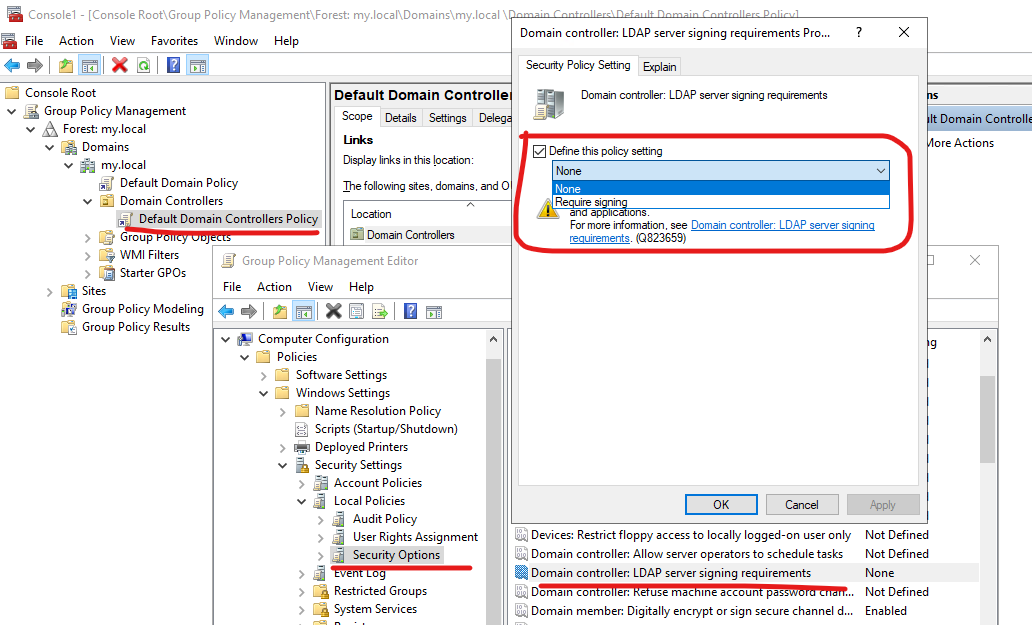
We use Registry:
PS C:\Users\Administrator> (Get-ItemProperty "HKLM:\SYSTEM\CurrentControlSet\Services\NTDS\Parameters").LDAPServerIntegrity
>>
1
PS C:\Users\Administrator> Set-ItemProperty HKLM:\SYSTEM\CurrentControlSet\Services\NTDS\Parameters `
>>   LDAPServerIntegrity 0
PS C:\Users\Administrator> (Get-ItemProperty "HKLM:\SYSTEM\CurrentControlSet\Services\NTDS\Parameters").LDAPServerIntegrity
>>
0
PS C:\Users\Administrator> gpupdate /force
Updating policy...

Computer Policy update has completed successfully.
User Policy update has completed successfully.
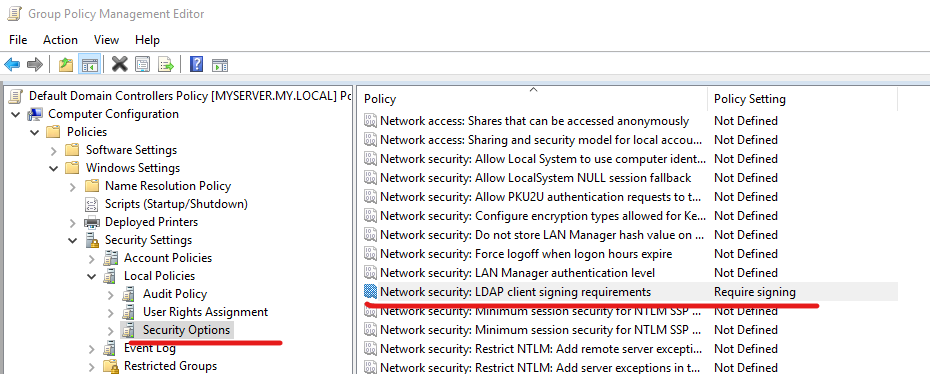
Setting Signing to Required on DC
I set it to required:
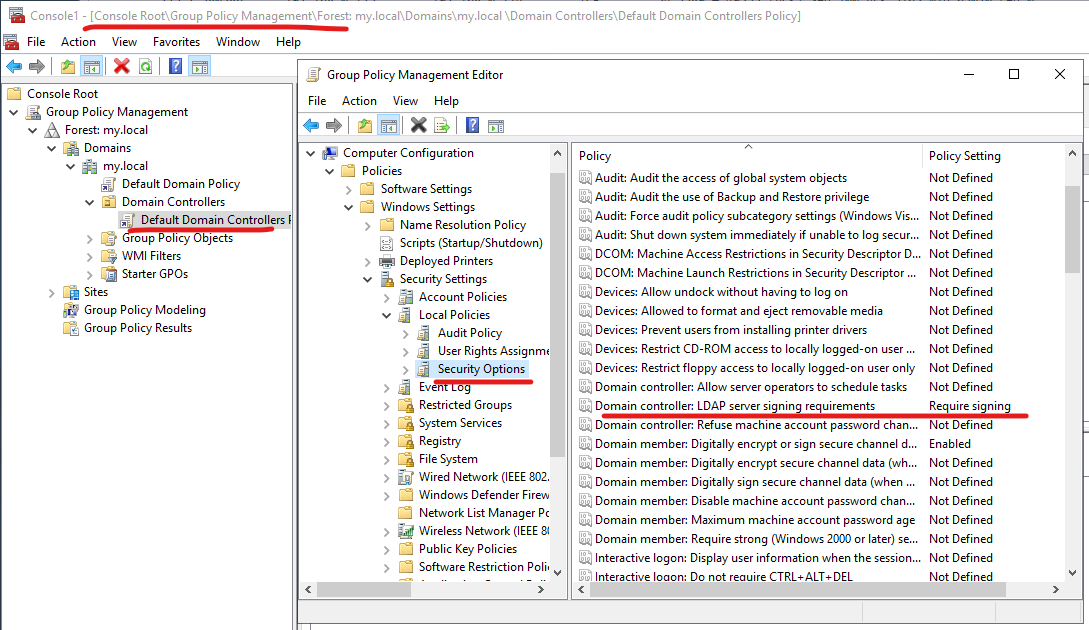
but nothing changed in WireShark, probably except FIN/RST flags:
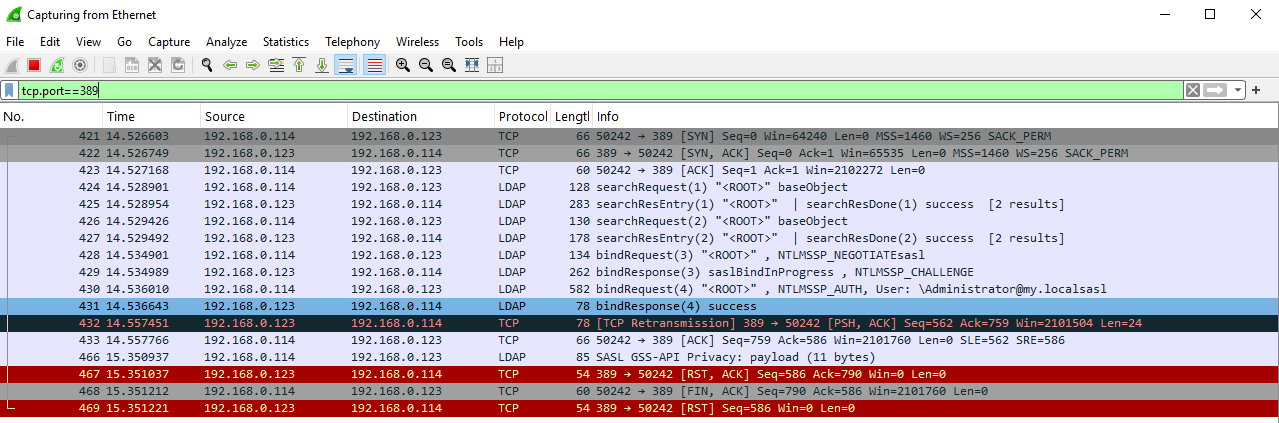
There is also the following option that also does not help:
Configuring the client
PS C:\WINDOWS\system32> (Get-ItemProperty "HKLM:\SYSTEM\CurrentControlSet\Control\Lsa\MSV1_0").NtlmMinClientSec
536870912
PS C:\WINDOWS\system32> Set-ItemProperty -Path "HKLM:\SYSTEM\CurrentControlSet\Control\Lsa\MSV1_0" `
>>                  -Name NtlmMinClientSec `
>>                  -Value 0 `
>>                  -Type DWord
PS C:\WINDOWS\system32> (Get-ItemProperty "HKLM:\SYSTEM\CurrentControlSet\Control\Lsa\MSV1_0").NtlmMinClientSec
0
Set-ItemProperty -Path "HKLM:\SYSTEM\CurrentControlSet\Control\Lsa\MSV1_0" `
                 -Name NtlmMinClientSec `
                 -Value 536870912 `
                 -Type DWord
Using ldapsearch on Ubuntu
sudo apt update
sudo apt install ldap-utils \
                 krb5-user \
                 libsasl2-modules-gssapi-mit
- ldap-utils — сам ldapsearch
- krb5-user — клиент Kerberos (kinit, krb5.conf)
- libsasl2-modules-gssapi-mit — SASL-модуль GSSAPI
ldapsearch -H ldap://my.local -Y GSSAPI -o sasl_secprops=none
SASL/GSSAPI authentication started
ldap_sasl_interactive_bind: Local error (-2)
        additional info: SASL(-1): generic failure: GSSAPI Error: Unspecified GSS failure.  Minor code may provide more information (Server not found in Kerberos database)
WireShark:

But kinit worked:
kinit administrator@MY.LOCAL
klist
Ticket cache: FILE:/tmp/krb5cc_1000
Default principal: administrator@MY.LOCAL

Valid starting     Expires            Service principal
11/27/25 17:15:53  11/28/25 03:15:53  krbtgt/MY.LOCAL@MY.LOCAL
        renew until 11/28/25 17:15:46
kvno ldap/my.local
kvno: Server not found in Kerberos database while getting credentials for ldap/my.local@MY.LOCAL
cat /etc/krb5.conf
[libdefaults]
        default_realm = MY.LOCAL

# The following krb5.conf variables are only for MIT Kerberos.
        kdc_timesync = 1
        ccache_type = 4
        forwardable = true
        proxiable = true
        rdns = false


# The following libdefaults parameters are only for Heimdal Kerberos.
        fcc-mit-ticketflags = true

[realms]
        MY.LOCAL = {
                kdc = MY.LOCAL
                admin_server = MY.LOCAL
        }
        ATHENA.MIT.EDU = {
                kdc = kerberos.mit.edu
                kdc = kerberos-1.mit.edu
                kdc = kerberos-2.mit.edu:88
                admin_server = kerberos.mit.edu
                default_domain = mit.edu
        }
        ZONE.MIT.EDU = {
                kdc = casio.mit.edu
                kdc = seiko.mit.edu
                admin_server = casio.mit.edu
        }
        CSAIL.MIT.EDU = {
                admin_server = kerberos.csail.mit.edu
                default_domain = csail.mit.edu
        }
        IHTFP.ORG = {
                kdc = kerberos.ihtfp.org
                admin_server = kerberos.ihtfp.org
        }
        1TS.ORG = {
                kdc = kerberos.1ts.org
                admin_server = kerberos.1ts.org
        }
        ANDREW.CMU.EDU = {
                admin_server = kerberos.andrew.cmu.edu
                default_domain = andrew.cmu.edu
        }
        CS.CMU.EDU = {
                kdc = kerberos-1.srv.cs.cmu.edu
                kdc = kerberos-2.srv.cs.cmu.edu
                kdc = kerberos-3.srv.cs.cmu.edu
                admin_server = kerberos.cs.cmu.edu
        }
        DEMENTIA.ORG = {
                kdc = kerberos.dementix.org
                kdc = kerberos2.dementix.org
                admin_server = kerberos.dementix.org
        }
        stanford.edu = {
                kdc = krb5auth1.stanford.edu
                kdc = krb5auth2.stanford.edu
                kdc = krb5auth3.stanford.edu
                master_kdc = krb5auth1.stanford.edu
                admin_server = krb5-admin.stanford.edu
                default_domain = stanford.edu
        }
        UTORONTO.CA = {
                kdc = kerberos1.utoronto.ca
                kdc = kerberos2.utoronto.ca
                kdc = kerberos3.utoronto.ca
                admin_server = kerberos1.utoronto.ca
                default_domain = utoronto.ca
        }

[domain_realm]
        .mit.edu = ATHENA.MIT.EDU
        mit.edu = ATHENA.MIT.EDU
        .media.mit.edu = MEDIA-LAB.MIT.EDU
        media.mit.edu = MEDIA-LAB.MIT.EDU
        .csail.mit.edu = CSAIL.MIT.EDU
        csail.mit.edu = CSAIL.MIT.EDU
        .whoi.edu = ATHENA.MIT.EDU
        whoi.edu = ATHENA.MIT.EDU
        .stanford.edu = stanford.edu
        .slac.stanford.edu = SLAC.STANFORD.EDU
        .toronto.edu = UTORONTO.CA
        .utoronto.ca = UTORONTO.CA
Kerberos started to work better:
dmitriano@Lenovo16:~$ kdestroy
dmitriano@Lenovo16:~$ kinit administrator@MY.LOCAL
Password for administrator@MY.LOCAL:
dmitriano@Lenovo16:~$ klist
Ticket cache: FILE:/tmp/krb5cc_1000
Default principal: administrator@MY.LOCAL

Valid starting     Expires            Service principal
11/27/25 17:30:24  11/28/25 03:30:24  krbtgt/MY.LOCAL@MY.LOCAL
        renew until 11/28/25 17:30:20
dmitriano@Lenovo16:~$ kvno ldap/myserver.my.local
ldap/myserver.my.local@MY.LOCAL: kvno = 5
But ldapsearch did not:
ldapsearch -H ldap://myserver.my.local -Y GSSAPI
SASL/GSSAPI authentication started
ldap_sasl_interactive_bind: Local error (-2)
        additional info: SASL(-1): generic failure: GSSAPI Error: Unspecified GSS failure.  Minor code may provide more information (Server not found in Kerberos database)
On DC:
setspn -L MYSERVER
Registered ServicePrincipalNames for CN=MYSERVER,OU=Domain Controllers,DC=my,DC=local:
        Dfsr-12F9A27C-BF97-4787-9364-D31B6C55EB04/myserver.my.local
        TERMSRV/MYSERVER
        TERMSRV/myserver.my.local
        ldap/myserver.my.local/ForestDnsZones.my.local
        ldap/myserver.my.local/DomainDnsZones.my.local
        DNS/myserver.my.local
        GC/myserver.my.local/my.local
        RestrictedKrbHost/myserver.my.local
        RestrictedKrbHost/MYSERVER
        RPC/f2e9d2ec-472a-4d24-8a4c-05df46a77536._msdcs.my.local
        HOST/MYSERVER/MY
        HOST/myserver.my.local/MY
        HOST/MYSERVER
        HOST/myserver.my.local
        HOST/myserver.my.local/my.local
        E3514235-4B06-11D1-AB04-00C04FC2DCD2/f2e9d2ec-472a-4d24-8a4c-05df46a77536/my.local
        ldap/MYSERVER/MY
        ldap/f2e9d2ec-472a-4d24-8a4c-05df46a77536._msdcs.my.local
        ldap/myserver.my.local/MY
        ldap/MYSERVER
        ldap/myserver.my.local
        ldap/myserver.my.local/my.local
I made ldapsearch work by adding the following SPN on DC:
setspn -S ldap/my.local MYSERVER
Using a Windows machine in the domain
Logged in from a Windows machine included into the domain, and WireShark displayed this:
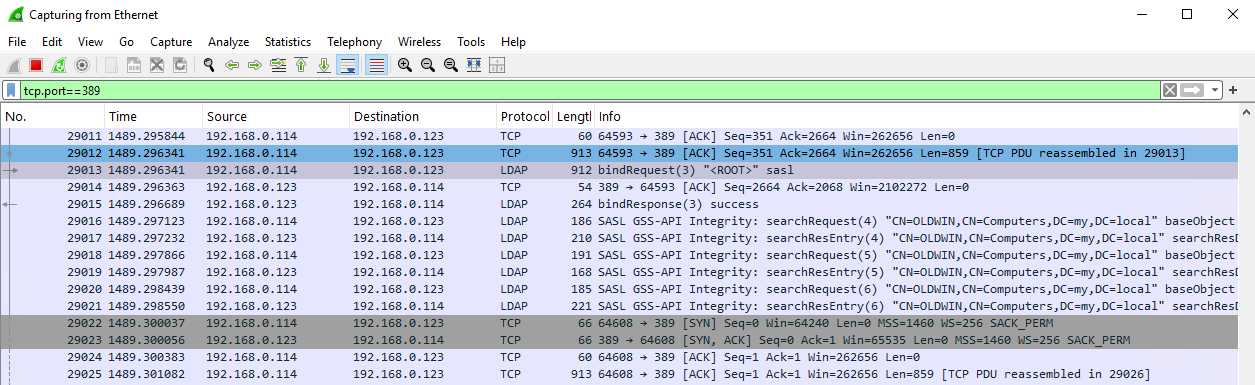
Executed the request from that machine with the command
ChannelTest.exe -c -l -s "my.local" -p "389" -u "Administrator@my.local" -w "1234@abc"
and it started to work via Kerberos and I got the following in WireShark:

Frame 346: Packet, 911 bytes on wire (7288 bits), 911 bytes captured (7288 bits) on interface \Device\NPF_{D1DF25F0-63A5-4702-A3DA-91F53DB3A5A8}, id 0
Ethernet II, Src: GigaByteTech_cf:f5:c6 (b4:2e:99:cf:f5:c6), Dst: Microsoft_00:91:01 (00:15:5d:00:91:01)
Internet Protocol Version 4, Src: 192.168.0.114, Dst: 192.168.0.123
Transmission Control Protocol, Src Port: 64527, Dst Port: 389, Seq: 1208, Ack: 2664, Len: 857
[2 Reassembled TCP Segments (1714 bytes): #345(857), #346(857)]
Lightweight Directory Access Protocol
    LDAPMessage bindRequest(3) "<ROOT>" sasl
        messageID: 3
        protocolOp: bindRequest (0)
            bindRequest
                version: 3
                name: <MISSING>
                authentication: sasl (3)
                    sasl
                        mechanism: GSS-SPNEGO
                        credentials […]: 6082068406062b0601050502a082067830820674a030302e06092a864882f71201020206092a864886f712010202060a2b06010401823702021e060a2b06010401823702020aa282063e0482063a6082063606092a864886f71201020201006e82062530820621a003020105a103
                        GSS-API Generic Security Service Application Program Interface
                            OID: 1.3.6.1.5.5.2 (SPNEGO - Simple Protected Negotiation)
                            Simple Protected Negotiation
                                negTokenInit
                                    mechTypes: 4 items
                                        MechType: 1.2.840.48018.1.2.2 (MS KRB5 - Microsoft Kerberos 5)
                                        MechType: 1.2.840.113554.1.2.2 (KRB5 - Kerberos 5)
                                        MechType: 1.3.6.1.4.1.311.2.2.30 (NEGOEX - SPNEGO Extended Negotiation Security Mechanism)
                                        MechType: 1.3.6.1.4.1.311.2.2.10 (NTLMSSP - Microsoft NTLM Security Support Provider)
                                    mechToken […]: 6082063606092a864886f71201020201006e82062530820621a003020105a10302010ea20703050020000000a38204b3618204af308204aba003020105a10a1b084d592e4c4f43414ca22e302ca003020102a12530231b046c6461701b116d797365727665722e6d792e6c6f63616c
                                    krb5_blob […]: 6082063606092a864886f71201020201006e82062530820621a003020105a10302010ea20703050020000000a38204b3618204af308204aba003020105a10a1b084d592e4c4f43414ca22e302ca003020102a12530231b046c6461701b116d797365727665722e6d792e6c6f63616c
                                        KRB5 OID: 1.2.840.113554.1.2.2 (KRB5 - Kerberos 5)
                                        krb5_tok_id: KRB5_AP_REQ (0x0001)
                                        Kerberos
                                            ap-req
                                                pvno: 5
                                                msg-type: krb-ap-req (14)
                                                Padding: 0
                                                ap-options: 20000000
                                                    0... .... = reserved: False
                                                    .0.. .... = use-session-key: False
                                                    ..1. .... = mutual-required: True
                                                ticket
                                                    tkt-vno: 5
                                                    realm: MY.LOCAL
                                                    sname
                                                    enc-part
                                                authenticator
                                                    etype: eTYPE-AES256-CTS-HMAC-SHA1-96 (18)
                                                    cipher […]: 603b9c5d0d4d380c5bce08b2a6f93112668631c9f2b11f1af93ba392fbb1b01d495d8efbc9befe2b11788815682810ec2fb7bcd906bc0de4a5913caa3970c6c7f3b6db470fb67a0120ea9dabc39a0bf0ed319d0076ab5bb436f745f5650e0455fb333f82b03670a17260aa555f9cd40a8
        [Response In: 348]
Installing ldp.exe
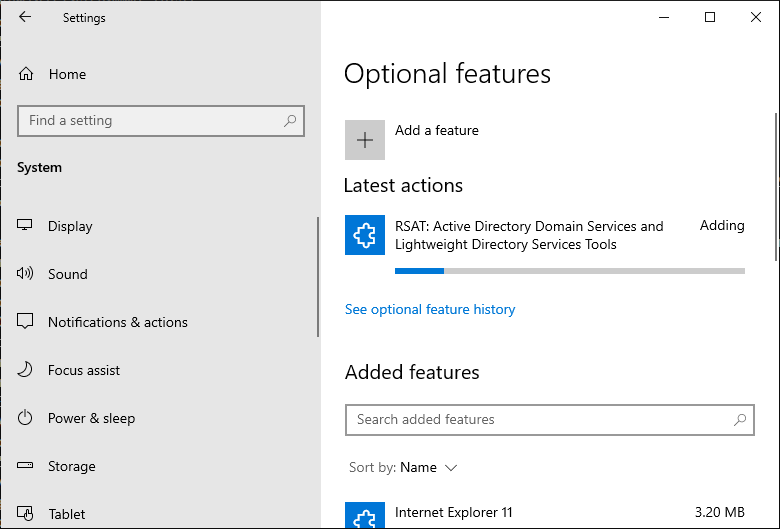
Binding with ldp.exe

-----------
0 = ldap_set_option(ld, LDAP_OPT_ENCRYPT, 1)
res = ldap_bind_s(ld, NULL, &NtAuthIdentity, NEGOTIATE (1158)); // v.3
	{NtAuthIdentity: User='Administrator'; Pwd=<unavailable>; domain = 'my.local'}
Authenticated as: 'MY\Administrator'.
-----------

Search:


Frame 125: Packet, 240 bytes on wire (1920 bits), 240 bytes captured (1920 bits) on interface \Device\NPF_{D1DF25F0-63A5-4702-A3DA-91F53DB3A5A8}, id 0
Ethernet II, Src: GigaByteTech_cf:f5:c6 (b4:2e:99:cf:f5:c6), Dst: Microsoft_00:91:01 (00:15:5d:00:91:01)
Internet Protocol Version 4, Src: 192.168.0.114, Dst: 192.168.0.123
Transmission Control Protocol, Src Port: 64566, Dst Port: 389, Seq: 1, Ack: 1, Len: 186
Lightweight Directory Access Protocol
    SASL Buffer Length: 182
    SASL Buffer
        GSS-API Generic Security Service Application Program Interface
            krb5_blob: 050406ff0000001c0000000010ddefc7712c5a558e639aba9487333d72cf0b678e1f3acb1622174eb264e8ddc1ba77f6106a440ad60d3abea3db9bc5
                krb5_tok_id: KRB_TOKEN_CFX_WRAP (0x0405)
                krb5_cfx_flags: 0x06, AcceptorSubkey, Sealed
                krb5_filler: ff
                krb5_cfx_ec: 0
                krb5_cfx_rrc: 28
                krb5_cfx_seq: 282980295
                krb5_sgn_cksum: 712c5a558e639aba9487333d72cf0b678e1f3acb1622174eb264e8ddc1ba77f6106a440ad60d3abea3db9bc5
        GSS-API Encrypted payload […]: 5d1e428f4e8149b7858541b6e43ed7e7d1fab4bf2358aba9e5413571ee9d243c04dc2d9df9c6e6566a1c2f6afba08e9df6939063c3e62790f4699bcffc27348d55305728a46ca03c0b4856b75e5b77b8fa14dc2150897d13341754ff24c4f6145d23613c7a611e
Investigating RFC 4752 (SASL GSSAPI)
Signing means SASL GSS-API Integrity:
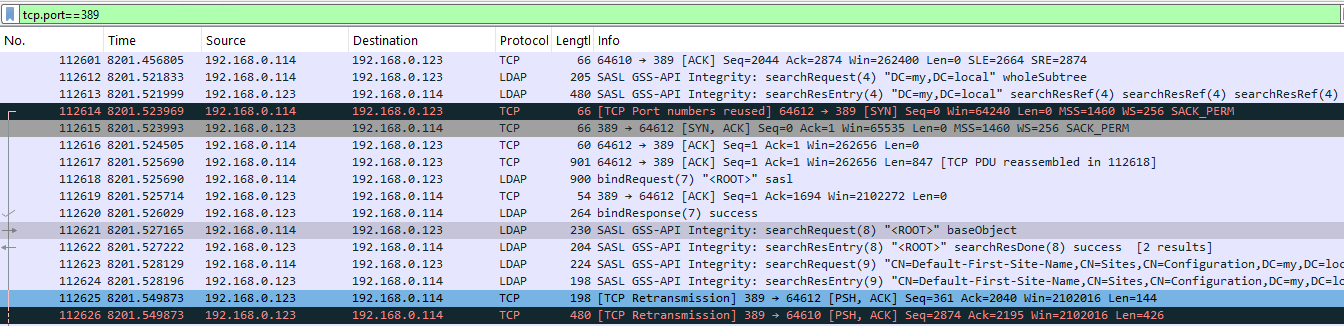
Frame 112621: Packet, 230 bytes on wire (1840 bits), 230 bytes captured (1840 bits) on interface \Device\NPF_{D1DF25F0-63A5-4702-A3DA-91F53DB3A5A8}, id 0
Ethernet II, Src: GigaByteTech_cf:f5:c6 (b4:2e:99:cf:f5:c6), Dst: Microsoft_00:91:01 (00:15:5d:00:91:01)
Internet Protocol Version 4, Src: 192.168.0.114, Dst: 192.168.0.123
Transmission Control Protocol, Src Port: 64612, Dst Port: 389, Seq: 1694, Ack: 211, Len: 176
Lightweight Directory Access Protocol
    SASL Buffer Length: 172
    SASL Buffer
        GSS-API Generic Security Service Application Program Interface
            krb5_blob: 050404ff000c000c000000006723c865f64faa4ff9f22b3957c36064
                krb5_tok_id: KRB_TOKEN_CFX_WRAP (0x0405)
                krb5_cfx_flags: 0x04, AcceptorSubkey
                krb5_filler: ff
                krb5_cfx_ec: 12
                krb5_cfx_rrc: 12
                krb5_cfx_seq: 1730398309
                krb5_sgn_cksum: f64faa4ff9f22b3957c36064
        GSS-API payload (144 bytes)
            LDAPMessage searchRequest(8) "<ROOT>" baseObject
                messageID: 8
                protocolOp: searchRequest (3)
                    searchRequest
                        baseObject: <MISSING>
                        scope: baseObject (0)
                        derefAliases: neverDerefAliases (0)
                        sizeLimit: 1
                        timeLimit: 240
                        typesOnly: False
                        Filter: (objectClass=*)
                        attributes: 2 items
                [Response In: 112622]
                controls: 1 item
Signing + Sealing mean SASL GSS-API Privacy, see search results above.
bindRequest and bindResponse are not wrapped with SASL, because security layer is not selected yet, and signing and sealing are not active.
NTML
This is LDAP bind via IP address from C#:

NTML is also wrapped in the same way probably:
Lightweight Directory Access Protocol
    SASL Buffer Length: 27
    SASL Buffer
        GSS-API Generic Security Service Application Program Interface
            NTLMSSP Verifier
                Version Number: 1
                Verifier Body: 19038f85ee0d0cb000000000
        GSS-API Encrypted payload: be4a98f670c777d7e824c2
Ensuring that the policies are applied
gpresult /r
Microsoft (R) Windows (R) Operating System Group Policy Result tool v2.0
© 2018 Microsoft Corporation. All rights reserved.
Created on 12/2/2025 at 12:57:46 AM
RSOP data for MY\Administrator on MYSERVER : Logging Mode
----------------------------------------------------------
OS Configuration: Primary Domain Controller
OS Version: 10.0.17763
Site Name: Default-First-Site-Name
Roaming Profile: N/A
Local Profile: C:\Users\Administrator
Connected over a slow link?: No
COMPUTER SETTINGS
------------------
CN=MYSERVER,OU=Domain Controllers,DC=my,DC=local
Last time Group Policy was applied: 12/2/2025 at 12:54:38 AM
Group Policy was applied from: myserver.my.local
Group Policy slow link threshold: 500 kbps
Domain Name: MY
Domain Type: Windows 2008 or later
Applied Group Policy Objects
-----------------------------
Default Domain Controllers Policy
Default Domain Policy
The following GPOs were not applied because they were filtered out
-------------------------------------------------------------------
Local Group Policy
Filtering: Not Applied (Empty)
The computer is a part of the following security groups
-------------------------------------------------------
BUILTIN\Administrators
Everyone
BUILTIN\Pre-Windows 2000 Compatible Access
BUILTIN\Users
Certificate Service DCOM Access
Windows Authorization Access Group
NT AUTHORITY\NETWORK
NT AUTHORITY\Authenticated Users
This Organization
MYSERVER$
Domain Controllers
NT AUTHORITY\ENTERPRISE DOMAIN CONTROLLERS
Authentication authority asserted identity
Denied RODC Password Replication Group
Cert Publishers
System Mandatory Level
USER SETTINGS
--------------
CN=Administrator,CN=Users,DC=my,DC=local
Last time Group Policy was applied: 12/1/2025 at 11:44:04 PM
Group Policy was applied from: myserver.my.local
Group Policy slow link threshold: 500 kbps
Domain Name: MY
Domain Type: Windows 2008 or later
Applied Group Policy Objects
-----------------------------
N/A
The following GPOs were not applied because they were filtered out
-------------------------------------------------------------------
Local Group Policy
Filtering: Not Applied (Empty)
The user is a part of the following security groups
---------------------------------------------------
Domain Users
Everyone
BUILTIN\Administrators
Remote Desktop Users
BUILTIN\Users
BUILTIN\Pre-Windows 2000 Compatible Access
Certificate Service DCOM Access
REMOTE INTERACTIVE LOGON
NT AUTHORITY\INTERACTIVE
NT AUTHORITY\Authenticated Users
This Organization
LOCAL
Group Policy Creator Owners
Domain Admins
Enterprise Admins
Schema Admins
Authentication authority asserted identity
Denied RODC Password Replication Group
High Mandatory Level